
BRIDGE Job Aids
Short, task-specific guides to walk BRIDGE users through common tasks.
Log in: Access BRIDGE (Oracle EPM Cloud) via your web browser.
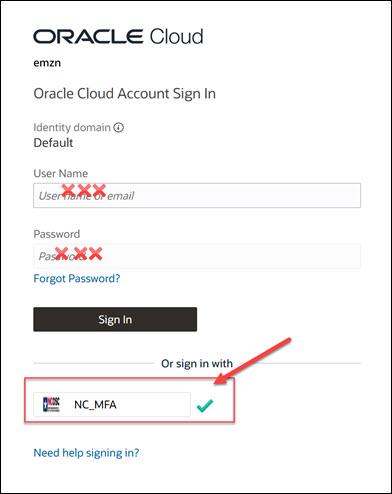
In the log in screen, select the NC_MFA button, which will prompt you for your state DIT account email and password (note that this is different from your NCID login).
Watch a short video on how to bookmark the link to BRIDGE
Downloadable guide on Steps to log into BRIDGE
Create a Base Budget Adjustment (BBA) Request
Add or Edit the Base Budget Adjustment Justification
Adjust Receipts and/or Requirements in a Base Budget Adjustment
Submit the Base Budget Adjustment Request
Check the Status of a BBA Request
Update Base Budget Actuals - DOT Only
Update Base Budget FTE Actuals - UNC System
Related Resource Guides
Use Smart View to Access Reports
Adjust Report to Show Data by Biennium
IBIS to BRIDGE Reports Crosswalk
| IBIS Report Name | BRIDGE Equivalent Report |
|---|---|
| Worksheet I Report | Base Budget Report (011, 012, 022) Book |
| Worksheet I Summary and Summary by Fund | Base Budget Report (RPT_BA_011) |
| Worksheet I Summary by Account | Base Budget Report - Detail by Account (RPT_BA_012) |
| Worksheet I Detail by Fund | Base Budget Report - Account by Budget Fund (RPT_BA_022)
|
| Worksheet I - All Segments | Base Budget Report - All Segments (RPT_BA_09) |
Related Resource Guides
Download & Install Smart View Excel Add On Some users will need to create an IT Help Desk ticket to install on their computer, depending on their permissions on their computer.
Use Smart View to Access Reports
How to Open Report in Smart View in a new Excel Workbook
Watch quick videos:
- How to update Base Budget Adjustment request receipts/requirements using Smart View
- How to open a BRIDGE form in a new Excel file