
Getting Started in BRIDGE
New User Access
- Contact your agency’s IBIS License Coordinator. The IBIS License Coordinator must submit an IBIS help desk ticket to request IBIS and BRIDGE access. OSBM will provide the License Coordinator information needed by your agency/university NCFS security administrator to submit a security ticket to assign your BRIDGE role.
- Enroll in BRIDGE training. Search for the BRIDGE courses in the NC Learning Center LMS and complete any required training, such as the BRI 100 Introduction to BRIDGE web-based course.
- An agency or university CFO may request a waiver for individual employees for situations in which a user cannot participate in or complete the mandatory BRIDGE training. Please review the Waiver Form for more details. Only a CFO may make training waiver requests.
- Complete the BRIDGE training course, including any post-course assessment.
- Access will be confirmed by OSBM or your IBIS License Coordinator.
Logging In
- Open the BRIDGE URL in your web browser.
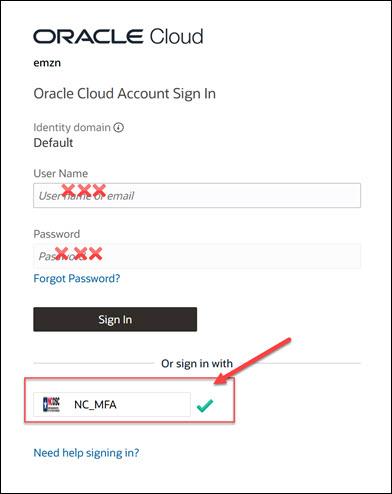
- A log in box will open. Click the NC_MFA button.
- You may be prompted to log in using your state email and password.
Bookmark the BRIDGE landing page
- Click the star in the address bar while you have BRIDGE open to make it a favorite. Name it BRIDGE.
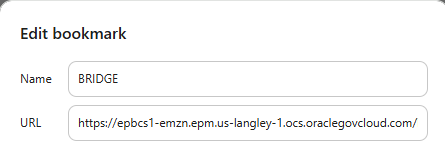
- The URL in the bookmark must be updated. Go into the favorites/bookmark menu and right click on the BRIDGE bookmark. Select Edit.
- Delete the long URL that appears in the edit bookmark box and replace it with this URL:
https: //epbcs1-emzn.epm.us-langley-1.ocs.oraclegovcloud.com/HyperionPlanning
On This Page Jump Links
On