What to report for OSBM grants
There are 5 main things grantees report:
- Expenses
- Quarterly Performance
- Interest earned (if applicable)
- Sales tax (if applicable)
- Audit (if applicable)
All items should be reported using the grant’s online reporting form in Smartsheet. If you are unsure of how to find your grant's reporting form, please contact your Grant Administrator or NCGrants@osbm.nc.gov.
For steps on how to submit your reports, please see How to report.
- Use Smartsheet: Report how you spent the grant money using the Link to Data Entry Form hyperlink in Smartsheet. Expenses can be reported in real time but must be submitted by the Quarterly Reporting deadlines.
- Submit Each Expense Separately: Do not group expenses together. Submit each one individually.
- Describe Expenses: Include details about what you bought and how it relates to your grant’s Scope of Work. If your grant supports more than one project, specify which project each expense is for.
- Report by Sub-Recipient: List expenses by sub-recipient, not the total disbursement to them.
- Employee Expenses: Submit these by each pay period.
- Pre-Grant Expenses: For eligible expenses before you received funds, report the actual date and the vendor paid. Do not list it as a reimbursement to your organization.
Additional Resources
Grantees must submit a Quarterly Performance Report every quarter. A performance report is required even if no expenses were made that quarter.
You must upload the completed Quarterly Performance Report into the Smartsheet reporting platform.
Download form: Quarterly Performance Report
See the step-by-step guide to uploading a quarterly performance report.
If your organization earns interest on the grant funds, you must report the amount earned. Interest should be reported as it is received.
Interest earned on grant funds must be used for the same purposes as the grant funds.
Report interest using similar steps to report expenses in Smartsheet.
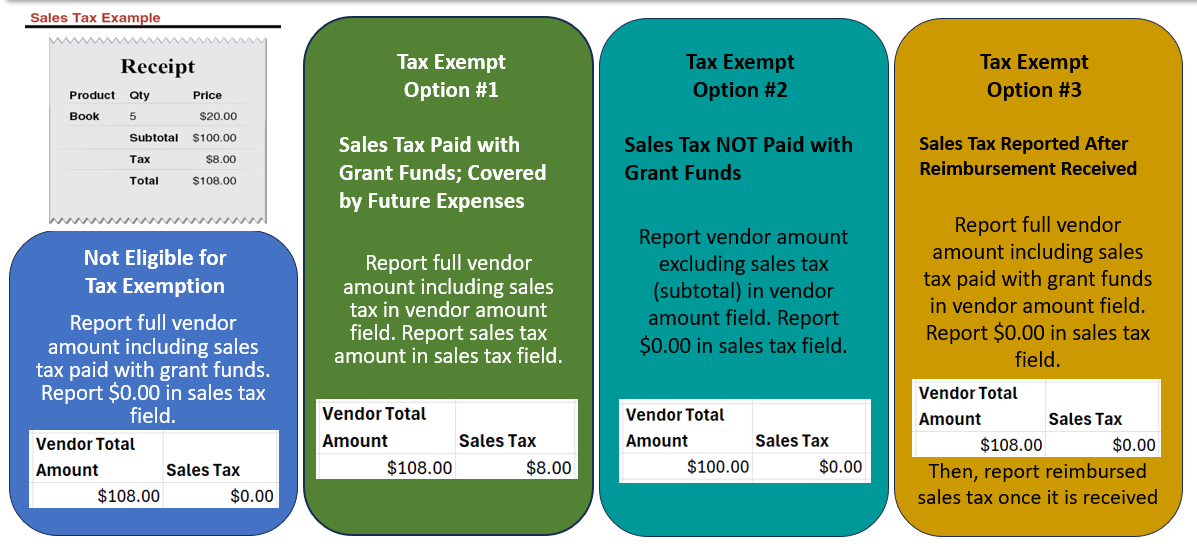
If your organization is not eligible for sales tax exemption, you can use grant funds for sales tax. Report the full vendor charge including any sales tax paid as the Vendor Total Amount in the reporting form in Smartsheet. Enter $0 in the Sales Tax field of your reporting form.
If your organization is eligible for sales tax exemption, you have three options for reporting sales:
Option #1: Pay the full amount including sales tax. Report the vendor amount in the Vendor Total Amount field. Report the sales tax paid in the Sales Tax field. This is the easiest method because it matches vendor invoices/receipts. The sales tax amount will not be deducted from your grant balance.
Option #2: Pay sales tax using another source of funds (not state grant funds). Report the vendor amount without tax in the Vendor Total Amount field. Report $0 sales tax paid in the Sales Tax field.
Option #3: Report the full amount paid in Vendor Total and report $0 in the Sales Tax field. Request a sales tax reimbursement from the state Department of Revenue. Once your organization is reimbursed by the state, submit the Reimbursed Sales Tax in your Smartsheet. This money must be used on your grant project.
See the training video on reporting sales tax and review the training slides.
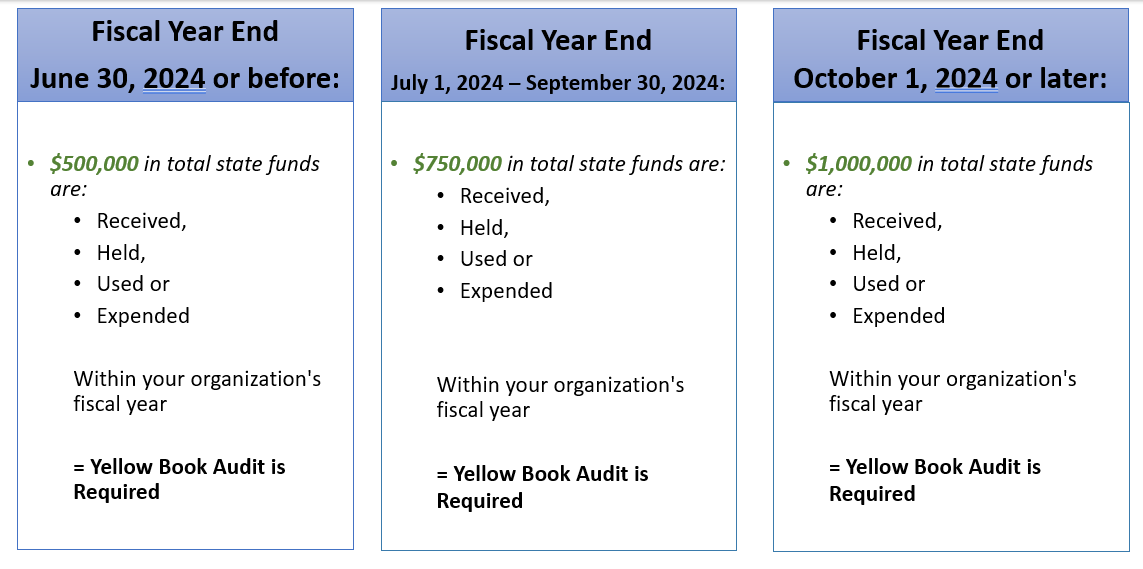
State grant recipients who have received a certain amount of state funds within their fiscal year are required to submit a yellow book audit, in accordance with Generally Accepted Government Auditing Standards. See 09 NCAC 03M.0205.
Please go to this link to find more information on audit requirements and thresholds.