
Step-by-Step Instructions
-
1
Label Budget Funds to comply with Section 5A.9
- For first-time appropriations, create a unique Budget Fund that corresponds to the appropriation purpose (the money item header in the Conference Committee Report). Include the statutory reference (SL 2026-41) in the Budget Fund description.
- If you have received multiple rounds of appropriations for a recovery activity, update the current Budget Fund description to list each session law that modified funding, including SL 2026-41. Programs with funding clawed back should list SL 2026-41 and the session laws with the original appropriations.
- Use the following format to revise the long titles of Budget Funds: [Agency] [Budget Code] [Purpose] [Session Laws]
- Example: DPS 24552 Helene State Match SL2024-51 SL2024-53 SL2025-26 SL2026-41
- Agencies should not use commas to separate session laws in the long titles to avoid mistakes when NCFS pulls the data.
- Agencies may eliminate the space between “SL” and the year and the session law number to reduce the overall length of the budget fund long title (as shown in the example). Agencies must keep the year and session law number together.
-
2
Create one or more unique Child Project(s) for each specific Helene recovery activity
- Use project descriptions that clearly reflect the purpose of the appropriation (e.g. the money item header in the Conference Committee Report or description from session law section).
- You are encouraged to create more than one child project for funds that support broad programs covering multiple activities.
- You may NOT use a generic “Helene” child project.
- Project codes should begin with the agency number followed by H, with the remaining seven digits up to the agency discretion
- example: 14H0000024
- Ensure all revenues, expenditures, and reimbursements are coded to these projects.
-
3
Ask OSC to tag the new child projects with the appropriate Helene DFF
- HLN APP ###S: New supplemental state and federal funds appropriated for Helene activities or reallocations directed in session law, showing the state funding share with ###S.
Examples:- HLN APP 0S: 100% federal funding
- HLN APP 50S: Combination of state and federal dollars with 50% state share
- HLN APP 100S: 100% state funding
- HLN NO APP ###S: Existing state and federal funds agencies choose to use to cover Helene activities, showing the state funding share with ###S.
Examples:- HLN NO APP 0S: 100% federal funding
- HLN NO APP 25S: Combination of operational funds and federal dollars with 25% state share
- HLN NO APP 100S: 100% state funding
- Reimbursement: When federal reimbursements or insurance payments are received for Helene expenses, code the revenue to the same Child Project that the agency used for the expenditures. Do not change the DFF assigned to the Child Project. For example, if the agency first recorded initial state funds expenditures in a Child Project with DFF HHL NO APP 100S, then later received full or partial FEMA reimbursement of those costs, the federal revenues should be captured in this same Project and DFF. The Project history will then show the total and net state costs for the specific activity over time.
- HLN APP ###S: New supplemental state and federal funds appropriated for Helene activities or reallocations directed in session law, showing the state funding share with ###S.
-
4
All Helene entries for an agency transfer-in using account 48100001 or internal transfers using account 48100003 must use an interfund
While in some cases an interfund may not be required from an accounting perspective, it is required for Helene reporting. The interfund for appropriations from the Hurricane Helene Fund is 201273.
-
5
Populate the budget field within the Project Life to Date report (RPTRTR003) with the entire amount of the appropriation for each project by completing the “Enter Budgets in Spreadsheet” task within the NCFS Budgetary Control App
See OSC’s reference guide. This is not an IBIS action and does not affect the account’s certified or authorized budget that appears on a BD 701 report.
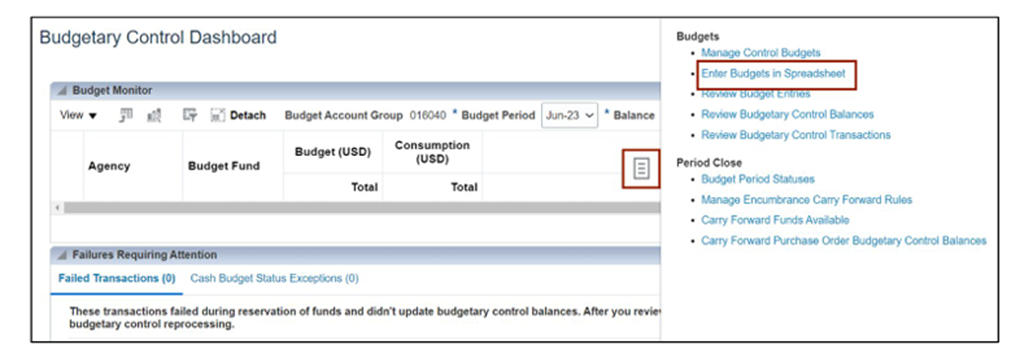
Access: If users do not have permission to access the Enter Budget Spreadsheet, request the NC Budget Entry JR role and complete the GM200 class (30 min).
Reach out to GROW NC analyst Nuray Eksen with any questions about NCFS setup and to notify GROW of new federal fund awards for Helene recovery work.