
Certification Instructions SL2026-1

Agency Certification Instructions –SL 2026-1 (Medicaid & HHS Adjust./Other Critical Needs)
Preface
This document provides:
- A high-level overview of the certification process;
- Step-by-step instructions for certification for changes in SL 2026-1; and
- A checklist for each task in the certification process.
Following these instructions closely will help to expedite the budget certification process and minimize the need to revisit tasks and/or revise entries.
Agencies Requiring Certification
- Administrative Office of the Courts
- Department of Adult Correction
- Department of Health and Human Services – Division of Health Benefits
- Department of Transportation
- General Assembly
- Office of State Auditor
- Office of State Budget and Management
- State Bureau of Investigation
- University of North Carolina
Timeline
| Date | Deadline |
|---|---|
| April 30 | Certification Instructions issued to agencies. |
| May 7 | Deadline for Agencies to complete all items on the Agency Certification Checklist. |
Process Overview
Following the passage of appropriations bills, agencies work with their OSBM Budget Development analyst to certify budget adjustments. Budget certification is done in the NC Integrated Budget Information System (IBIS) and will interface with the North Carolina Financial System (NCFS). Agencies submit certification entries, which reflect adjustments (+/-) that appropriation bills made to the existing base budget. OSBM analysts review entries to ensure they are correct. When all entries have been approved and interfaced with NCFS, OSBM analysts generate a BD 307, which is the official certification report that reflects changes as enacted by the General Assembly.
Step by Step Guide for Budget Certification:
- IBIS. Agencies and OSBM will use IBIS to certify SL 2026-1.
- The direct link to the IBIS system is http://ibis.nc.gov/ibis-webapp/IBIS.html.
- If you have system access issues, submit an IBIS Help Desk Ticket at https://bit.ly/IBISHelp.
- For detailed instructions on how to use IBIS certification forms, see the Operating Certification user guide in the Job Aids section on OSBM’s website (under the ‘Certification’ tab).
- Enacted Legislation. Work with your OSBM Budget Development analyst to review SL 2026-1 to ensure the agency is certifying all items; balancing appropriation and allocation totals; and that items are certified in the correct Budget Codes and Budget Funds.
- NCFS Chart of Account Maintenance.
- Important: Identify any Chart of Account (COA) Interfund segments needed and move forward with establishing Budget Funds and corresponding Interfund segments as soon as possible. Please share and/or request Interfund segments needed for certification with your Budget Development analyst as early in the process as possible. Many agencies have experienced delays related to creating and sharing these segments during previous certification processes.
- OSBM leads the process for creating new Budget Codes and Budget Funds. Identify any new Budget Codes and Budget Funds needed and submit these requests to OSBM for approval via IBIS.
- Agencies will also need to identify any new chart of account segments needed outside of Budget Codes and Funds required for certification. OSC leads this process:
- Agencies will need to submit a spreadsheet template to OSC for changes to Agency Management Unit, Agency Program, and Project that are not currently being used.
- The template can be found here: NCFS COA Maintenance | NC OSC
- New NCFS Account requests are submitted via this form and follow the standard review process with the OSC Financial Reporting team and COA Committee.
- Statewide, OSBM, Negative, and Capital Reserves – Some appropriations may come from statewide reserves. Generally, agencies should use the statewide account number 48100001 – Agency Operating Transfer for all transfers received from new statewide reserves.
An interfund number is required for transfers from these reserves. For statewide reserves, these usually start with the Budget Code and end with a zero. A list of interfund numbers for statewide reserves in SL 2026-1 is below:
A list of interfund numbers for statewide reserves in SL 2026-1 is below: Reserve Name Interfund Medicaid Contingency Reserve 199310 - Certifying Allocations and Cash Balance Transfers. The enacted bill may appropriate funds to an agency to be allocated to other state agencies and non-state entities. In these cases, the appropriation and subsequent allocations are certified.
- The certification entry for an agency receiving state appropriation to be transferred should include the transfers out to other entities receiving the allocations in the agency’s expenditure accounts.
- A state agency receiving an allocation must also submit a certification entry certifying this allocation in its receipt accounts.
- This same principle applies to cash balance transfers —one agency must certify the transfer out of the cash balance in its expenditure accounts and the receiving entity must certify the transfer in of these funds in its receipt accounts.
- All transfers in NCFS require the interfund segment. Agencies should work with your OSBM development analyst to verify the correct reciprocal Budget Fund needed.
- Certification Forms. Agencies create new certification forms in IBIS for all items.
- Once you have logged into IBIS, from the Work Queue page, click on ‘Create New Request’, selecting the ‘Budget Certification’ and then the ‘Operating’ options.
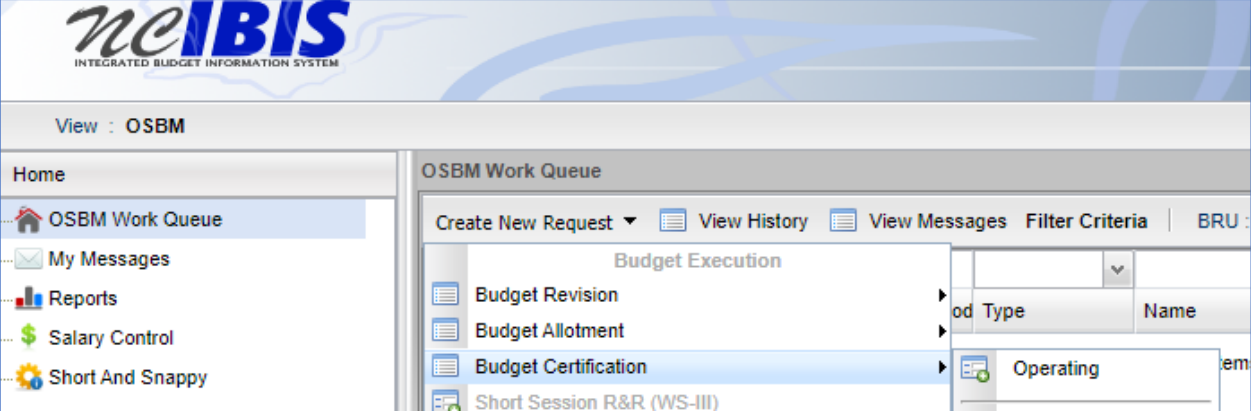
- Once you have logged into IBIS, from the Work Queue page, click on ‘Create New Request’, selecting the ‘Budget Certification’ and then the ‘Operating’ options.
- New Certification Form – Popup. When you create a new certification request, IBIS will bring up a popup screen. Choose the appropriate option from the dropdown menus for Session Law, Department/University, BRU, and Budget Code.
- For Committee Report Item Title, enter the section title from the bill associated with the item and R or NR, depending on whether the item is recurring or non-recurring.
- Example: For funds appropriated to Department of Transportation (DOT) in Section 7.1(a) of SL 2026-1, the title would be ‘Operating Shortfall – NR’.)
- Choose the Budget Adjustment Type from the dropdown menu.
- Select Yes or No to answer the question about whether the item is recurring. If an item has both recurring and non-recurring adjustments, prepare a separate certification entry for each.
- For Committee Report Item Title, enter the section title from the bill associated with the item and R or NR, depending on whether the item is recurring or non-recurring.
- Basic Information Tab. IBIS carries forward the information from the popup screen. Fill out the remaining spaces of the Basic Information tab.
- For the Committee Report Item Number, enter the section number. Continuing the DOT example above, the Committee Report Item Number would be ‘7.1A’.
- For the Committee Report Item Narrative, please cite the appropriations provision. In this example, it would refer to Section 7.1(a), so copy the language appropriating the funds.
- Position Tab. OSBM encourages agencies to create and abolish positions as part of certification on the Positions Tab. Note: SL 2026-1 does not establish new positions.
- The Fiori HR/Payroll System assigns position numbers for new positions when the agency initiates a workflow action (PCR). Budget personnel should coordinate with their agency HR personnel to ensure new positions and abolished positions are established or eliminated in both the IBIS and Fiori HR/Payroll systems. If your HR department will not be able to provide position numbers in time to complete certification, consult your OSBM development analyst.
- Agency budget and HR personnel should coordinate when establishing new positions to ensure their PCR entries match their respective certification entries. Specifically, note that position number, position name, effective date (7/1/2025 in most cases), and annual salary need to match. Please work with your HR Directors to ensure all new positions have an effective date of 7/1/2025 unless otherwise stated in legislation.
- Use the FY 2025-26 retirement and health plan rates, provided below, when creating new positions established in SL 2026-1.
Per SL 2025-89, the employer contribution rates for FY 2025-26 are:
Employer Contribution Rates for New Positions TSERS LEO ORP CJRS LRS Retirement 17.14% 17.14% 6.84% 37.73% 18.26% Health 7.33% 7.33% 7.33% 7.33% 7.33% Disability 0.07% 0.07% 0.07% 0.00% 0.00% Death 0.13% 0.13% 0.00% 0.00% 0.00% NC 401(k) 0.00% 5.00% 0.00% 0.00% 0.00% FY 2025-26 Total Contribution Rate 24.67% 29.67% 14.24% 45.06% 25.59% The maximum State Health Plan amount for active employees for FY 2025-26 per Section 3.6(c) of SL 2025-89 is $8,500. The amount for retired employees is included in the total retirement contribution rate.
- Budget Detail tab. Fill in the Budget Detail as needed. The form will only allow agencies to select Chart of Account segments that have been validated. Please refer to Appendix A for guidance on the use of Fund Source.
- If IBIS does not show the chart of account sequence you need when filling out the Budget Detail tab, please request new chart of account combinations from NCFS.
- If agencies do not see chart segments populate in IBIS, agencies can run the NCFS Chart of Accounts Combination Report (RTR157 – Available in: Shared Folders > Custom > FBRCustom > General Ledger) to confirm existing and valid chart segments.
Use the Agency Account Combination Template to request any new account combinations needed to complete IBIS entries. After OSC approves and successfully uploads changes to NCFS, the new COA segments will interface with IBIS at noon or overnight.
- Bulk Upload Form. Agencies may use the upload template for IBIS certification forms to speed up certification entry. This form is available in IBIS and allows agencies to enter multiple lines for a single certification entry into an Excel spreadsheet. Agencies can then upload it into IBIS after completing the Basic Information Tab. This form may streamline entering complex entries into IBIS.
For the Budget Detail tab, select ‘Excel Processing’ and then ‘Upload & Process’ (as shown below). Make sure that all needed Chart of Account segments are validated so IBIS does not reject the entry.

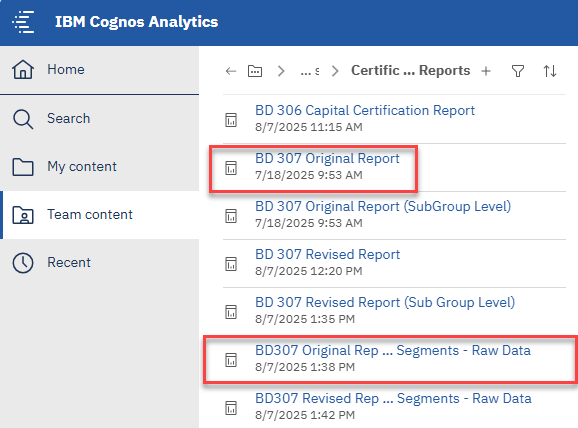
- BD 307 Reports. Once certification forms are entered, agencies can generate a BD 307: IBIS>Reports>Self Service Reports>Certification Reports>.
- There are two BD 307 options: BD 307 Original Report and BD 307 Revised Report. In the Long Session, agencies should run the BD 307 Original Report.
- Agencies can also run the BD 307 Original Report – All Segments – Raw Data to ensure certification is correctly reflected for the entire chart sequence.
- Agencies can run a BD 307 to include forms in draft status (includes any forms not submitted to OSBM), OSBM status (includes any form submitted to OSBM but not approved), or in an approved status (includes any forms approved by OSBM). This allows agencies to create and review a BD 307 before all certification entries have been approved.
- Agencies should review their BD 307 to identify any negative certified budgets and accounts and work with their OSBM analyst to address them.
- OSBM Notification. Notify your OSBM Budget Development analyst once your entries are ready for review. When OSBM has completed its review and has approved all entries, IBIS will interface with NCFS overnight. Your OSBM analyst will notify you when the certification interface is complete.
- IBIS/NCFS Reconciliation. Once your OSBM Budget Development analyst has notified you that IBIS has interfaced with NCFS, the next step is to verify that the budget information in NCFS matches that in IBIS. To do this, you will need to run a May 2026 BD 701 Report in NCFS and compare it at the account level to the IBIS-generated BD 307. IBIS and NCFS should match and include the base budget, any previously certified appropriations, and the new appropriations from SL 2026-1. If the BD 701 and BD 307 do not match, the agency will need to work with OSBM to reconcile and correct any differences.
Responsibilities for Reconciliation Check: OSBM checks that all systems reconcile at the Budget Code and Budget Fund levels. Agencies should ensure certification entries are correct at the detailed account level when reconciling between the BD 307 and the BD 701.
- Official Certification Copy. The budget is considered certified once the State Budget Director has signed it. Your OSBM Budget Development analyst will send an electronic copy of your signed BD 307 to complete the certification process.
Agency Certification Checklist
- ☐ 1. Review SL 2026-1.
- ☐ 2. Submit any new Budget Code and Budget Fund requests in IBIS to OSBM. Submit any new NCFS chart of account requests to OSC.
- ☐ 3. Create certification entries in IBIS.
- ☐ 4. If applicable, review all transfers and confirm that the interfund is correct.
- ☐ 5. Review accounts in your agency’s BD 307 to confirm accuracy and identify any negative accounts and work with your OSBM development analyst to resolve.
- ☐ 6. Notify your OSBM development analyst that your entries are ready for review. When OSBM has completed its review, IBIS will interface with NCFS. Your OSBM analyst will notify you when the certification interface is complete.
- ☐ 7. Review the BD 701 in NCFS against the BD 307 in IBIS to ensure IBIS and NCFS match.
- ☐ 8. If IBIS and NCFS do not match, work with your OSBM Budget Development and Execution analysts, if applicable using RK 325 and / or RK 314 reports to match with certified budgets adjusted by Type 11 revisions, and / or identify and correct any errors.
- ☐ 9. Notify your OSBM Budget Development analyst that IBIS and NCFS match. Your OSBM Budget Development analyst will send you an official signed copy of your BD 307.