Capital Budget Code Closure JA
Capital Budget Code Closure Job Aid
Contents
Preface
This job aid is intended for use by state agencies and University of North Carolina campuses during year-end closeout preparation process. The document details: how to identify capital budget codes that should be closed, processes for preparing capital budget codes for closure, and the process for closing capital budget codes. The Budget Code Closure Request Form referenced in this document is also available on OSBM’s website.
In the 4th quarter of each fiscal year, agencies and campuses receive closeout instructions in the form of a memo from the Office of State Budget and Management (OSBM). Agencies and University of North Carolina campuses should use this job aid prior to receiving the closeout memo from OSBM in preparation for capital budget year-end close out. This job aid can also be used at any time during the fiscal year to assist in budget code clean up in preparation for closing capital budget codes.
Closing inactive and unneeded budget codes helps agencies and universities maintain clean and up-to-date records of financial activity. A budget code cannot be closed with any documented current year activity, therefore it is important to prepare for budget code closure prior to July 1 of a new fiscal year.
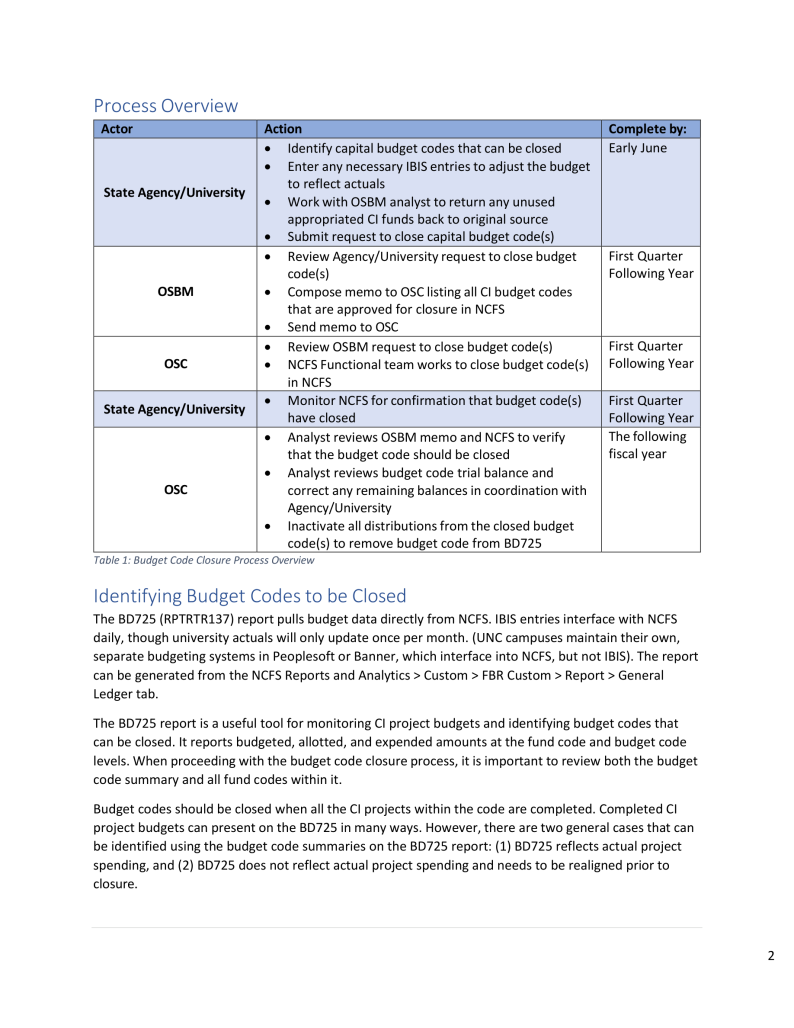
Process Overview
| Actor | Action | Complete by: |
|---|---|---|
| State Agency/University |
|
Early June |
| OSBM |
|
First Quarter Following Year |
| OSC |
|
First Quarter Following Year |
| State Agency/University |
|
First Quarter Following Year |
| OSC |
|
The following fiscal year |
Identifying Budget Codes to be Closed
The BD725 (RPTRTR137) report pulls budget data directly from NCFS. IBIS entries interface with NCFS daily, though university actuals will only update once per month. (UNC campuses maintain their own, separate budgeting systems in Peoplesoft or Banner, which interface into NCFS, but not IBIS). The report can be generated from the NCFS Reports and Analytics > Custom > FBR Custom > Report > General Ledger tab.
The BD725 report is a useful tool for monitoring CI project budgets and identifying budget codes that can be closed. It reports budgeted, allotted, and expended amounts at the fund code and budget code levels. When proceeding with the budget code closure process, it is important to review both the budget code summary and all fund codes within it.
Budget codes should be closed when all the CI projects within the code are completed. Completed CI project budgets can present on the BD725 in many ways. However, there are two general cases that can be identified using the budget code summaries on the BD725 report: (1) BD725 reflects actual project spending, and (2) BD725 does not reflect actual project spending and needs to be realigned prior to closure.
- In some cases, a completed project will result in full expenditure of budgeted funds. The BD725 will show the following:
- Fully allotted funds
- Zero spending in the current month
- Zero spending year to date
- Zero allotment balance
Figure 1: BD725 showing budget code summary

The budget code in the example above contains four (4) budget funds. As evidenced by the clean summary, all the fund codes have allotted and spent all the budgeted funds available. All budget summaries should look like the example above prior to requesting closure. The budget code summary can be selected as a view using the “Mode” parameter when running the BD725 report.
- In some cases, a completed project will result in partial expenditure of budgeted funds. The BD725 will show the following:
- Unallotted funds (could also be fully allotted)
- Zero spending in the current month
- Zero spending year to date
- Remaining allotment balance
Figure 2: BD725 showing budget code summary
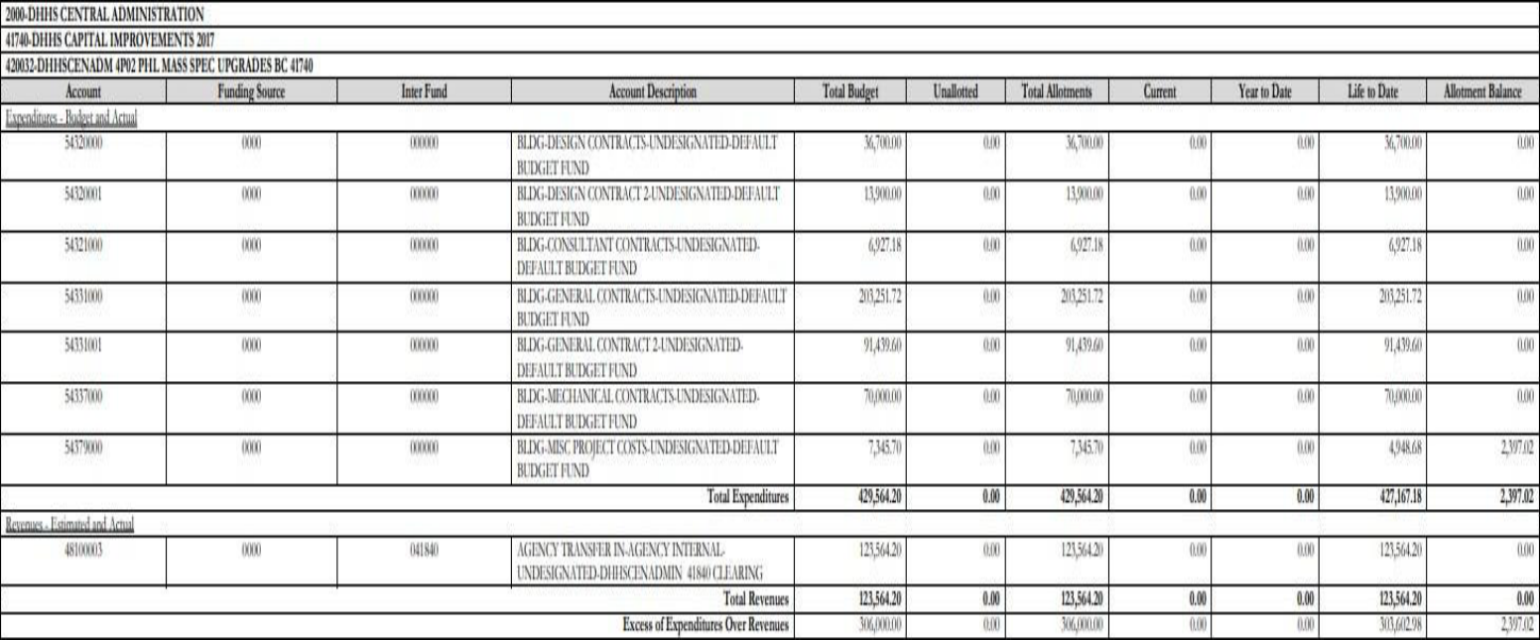
The budget code in the example above contains three (3) budget funds. As evidenced by the budget code summary, no spending has occurred within this budget code during this fiscal year, but there are remaining funds that must be adjusted to reflect actual spending. These adjustments should be made via Allotment Requests and Budget Revision entries in IBIS.
NOTE: The examples in this section are only two of many ways a BD725 might present a completed CI project budget code. Contact your OSBM analyst if there are any questions regarding whether a budget code is eligible for closure.
Preparing for Budget Code Closure
After identifying budget codes to be closed, adjustments to the budgeted and allotted amounts are required to ensure a match between the budget and actual project spending. If the budget code has remaining allotment balances and/or budget amounts exceeding the project to date spending, all budget funds within the budget code should be reviewed.
In general, there are two options for use of excess funds when closing a budget code: (1) returning excess funds to the original fund source, and (2) repurposing excess funds by transferring them to a project in a different budget code. If an agency or university is interested in utilizing the second option listed, consultation with the OSBM capital analyst is required prior to conducting the transfer entries in IBIS. Please note, not all funds can be transferred and repurposed in a new budget code.
Corrective budget revisions and negative allotment requests should be submitted via IBIS for each budget fund showing balances greater than zero in the following BD725 columns: Unallotted, Allotment Balance. Agencies and universities should complete these adjustments prior to submitting the formal request to OSBM to close the budget codes. Agencies are encouraged to use internal revisions and allotments, where appropriate, prior to submitting requests in IBIS.
Transferring Excess Funds to a New Budget Code
In some cases, if a capital project is complete and has available excess budget, the remaining funds can be transferred to a new budget code if deemed allowable by the OSBM capital analyst. After consulting with OSBM, the following BD725 reviews and IBIS entries should be submitted:
Preparation of Budget Code funds are being transferred FROM (Non-SCIF):
- Review BD725 to identify the status of allotted funds
- If funds are allotted, see step #2
- If funds are not allotted, submit Allotment Request in IBIS to allot all funds being transferred
- Enter an Internal Budget Revision to move funds into a transfer expenditure account line:
- Select the correct interfund of the project receiving the funds.
Preparation of Budget Code funds are being transferred FROM (SCIF):
- Review BD725 to identify the status of allotted funds
- If funds are unallotted, see step #2
- If funds are allotted, submit negative SCIF Allotment Request to return funds to OSBM
- Submit an External Budget Revision to reduce project budget
Preparation of Budget Code funds are being transferred TO:
- Enter an External Budget Revision to receive transferred funds into a receipt account line
- Select the correct Inter Fund of the project sending the funds.
- For SCIF, use the same account combination that was reduced in the project sending the funds
- Enter an Allotment Request to allot any or all the transferred funds for use in the new budget code.
NOTE: It is important that the justification sections of all budget revisions and allotment requests reflect as much detail as possible regarding the transfer of funds to a new budget code. This will result in a timelier approval process.
Reducing the Budget to Reflect Actual Project Spending
If transferring unused funds is not allowable, feasible, or necessary, agencies and universities still must reduce excess budgets to reflect actual project spending. The BD725 is the most effective tool for identifying budget codes and fund codes that require budget adjustment. Each fund code within the budget code being prepared for closure will need to be reviewed for budget excess. IBIS entries are required to adjust the fund code budgets.
- Identify budget codes to be closed that contain excess allotted funds and budget.
The budget code example above was identified in the previous step as a code that should be closed, but that needs to be adjusted prior to closure. This budget code contains four (4) fund codes.
- Identify fund codes within the budget code that are the source of the excess allotted funds and budget. Submit the appropriate IBIS requests to adjust the budget to reflect actual project spending. Each example listed includes the corresponding necessary IBIS request information.
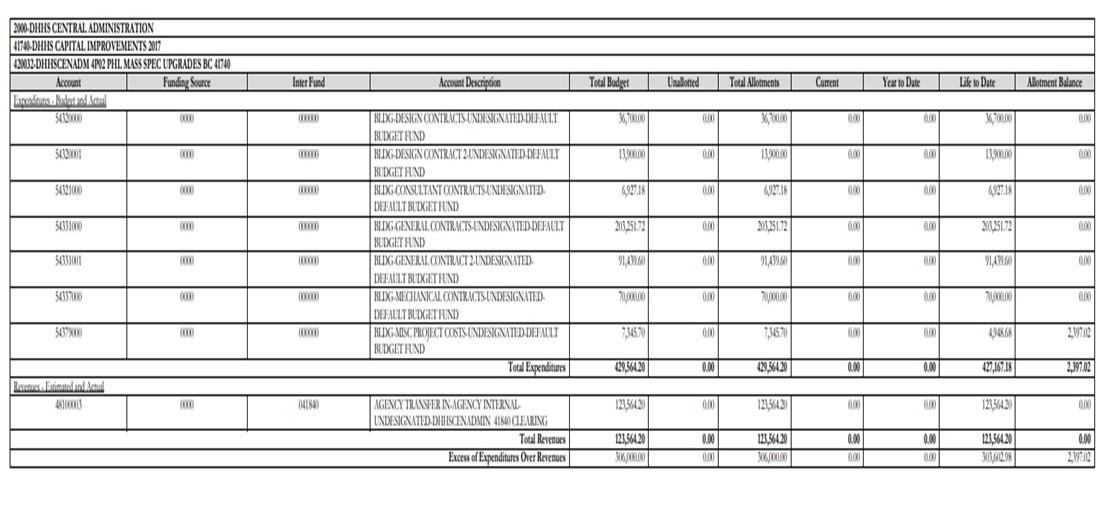
Figure 3: BD725 showing fund code summary
Example: - 430032- Required IBIS Entries
- External Budget Allotment – Negative Allotment by 2,397.02
- External Budget Revision – Reduce budget by $2,397.02
NOTE: Once IBIS entries are submitted and approved in IBIS, the BD725 will update to show a clean budget report wherein all budgets accurately reflect project spending. (Universities will not see immediate updates to the BD725 due to the once per month interface of Banner/PeopleSoft to NCFS).
Returning Appropriated CI General Funds
In most cases, appropriated Capital Improvement funds must be returned if any excess remains at the end of the project. However, agencies and universities may be able to transfer funds through the Project Reserve Account for various types of projects. Agencies and universities should work with OSBM capital analyst(s) to appropriately return these funds.
Closing General Fund Supported Debt Budget Codes (General Obligation Bonds, Two Thirds Bonds, Special Indebtedness, Certificates of Participation)
The State closed all debt supported projects in FY 2025-26. All budget codes should be closed that are supported by such debt. Agencies and campuses should reduce their budget to actual via a revision and request that the budget code be closed.
Formal Request for Budget Code Closure
Once per year, OSBM will alert all agencies and universities of the due date for budget code closure requests. Prior to that date, all of the previously mentioned reviews, consultations, and IBIS entries should be completed.
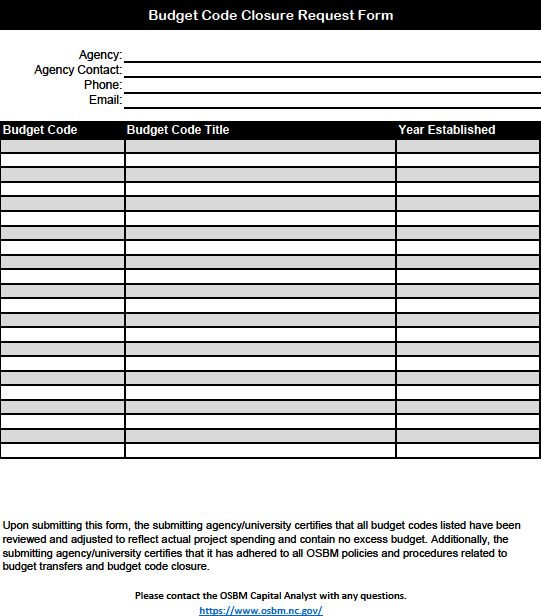
The due date for submitting requests will be published annually by OSBM in early May of each fiscal year. A template for budget code closure request can be found in Appendix A of this job aid.
Upon receipt of the formal request, OSBM analysts will review each budget code and contact agencies/universities if questions arise or additional IBIS entries are needed. Once all requests are validated by OSBM, the list will be submitted by OSBM to the Office of the State Controller (OSC). Staff at OSC will conduct a review of the lists provided and the NCFS Functional team will work to close the budget codes in NCFS.
For more information on OSC’s review visit this website.
Budget Code Closure Monitoring
At the end of the fiscal year, it is the responsibility of each agency and university to monitor NCFS to ensure all budget codes listed on the formal request have been closed. OSBM and OSC rely heavily on agencies and universities to diligently monitor the status of each of their budget codes during this step of the process.
OSC analysts will work to close budget codes in NCFS upon receipt of OSBM’s memo and then will work to close budget codes in NCAS.
A budget code is not removed from the BD725 until it has been officially closed in NCFS.
Appendix A
Budget Code Closure Request Form
A fillable PDF version of this form is available on OSBM’s website under “Capital Job Aids” and “Closeout/Carryforward Job Aids” and linked here.